
Boarding pass wedding invitation — with a playful seat map
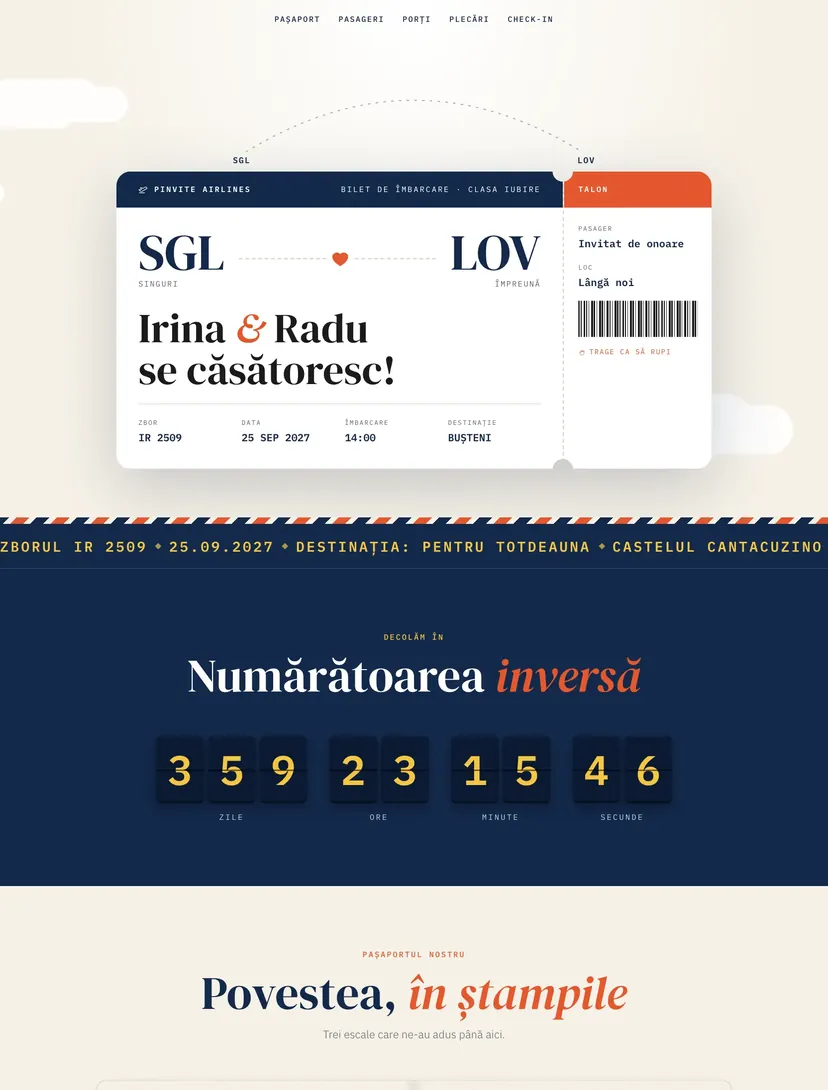
The invitation is a boarding pass with a stub the guest tears off with a finger. The countdown appears on a split-flap board, your story is stamped in a passport, and the confirmation section has a playful seat map.
Why guests will pass the link on
Every Pinvite design has a surprise interaction built around its theme. In Boarding Pass: a stub that tears off and a seat map.
A stub that tears off
The guest pulls the stub, it comes loose, and a button appears that saves the date straight into the phone calendar.
Departures board
The day's program as at an airport: times, gates and statuses, with letters that flip until they settle.
The story in stamps
Every chapter is a passport page with a photo and a stamp that drops onto the page as you scroll.
A playful seat map
The confirmation section shows a seat map the guest can tap to pick a seat. It is only a visual touch: the seat is not saved with the confirmation and no boarding pass is sent.
Colors and fonts of the Boarding Pass design
A recommended starting point from our designers. Keep them or change them in the editor.
#F6F1E7#13294B#E4572E#F5C542The Boarding Pass invitation: for which celebration
Boarding-pass invitations are among the most shared on social media, especially for destination weddings or for couples who met while traveling. The digital version does what paper cannot: the stub tears, the plane takes off and the departures board updates live.
The design works just as well as a save the date sent months ahead and as a full invitation with RSVP. Airport codes, flight number and the names of the passengers are changed in the editor.
What the invitation contains
The sections of this design, ready to use. Hide the ones you do not need.
From design to the link you send
Start from Boarding Pass
Open the design in the editor, no card needed.
Make it yours
Change the names, date, venues, photos and texts. Preview on the phone in real time.
Send the link
On WhatsApp, by email or as a QR code on the printed invitation. Confirmations arrive live in your list.
About the Boarding Pass design
Can I use the design only as a save the date?
Is the seat picked on the map saved?
Can I change the colors, fonts and texts?
How do guests confirm?
How much does a Pinvite wedding website cost?
Does it work well on a phone?
Similar designs
Your wedding, in Boarding Passstyle.
Open the design in the editor, personalize it in minutes and send the link. Free for up to 15 confirmations.