
Coquette wedding invitation — bows, pearls and romance, with RSVP
Guests untie the bow of a gift box to enter the site. Bows and hearts float in the background, your story is read in letters that flip on touch, and the program hangs on a pink ribbon.
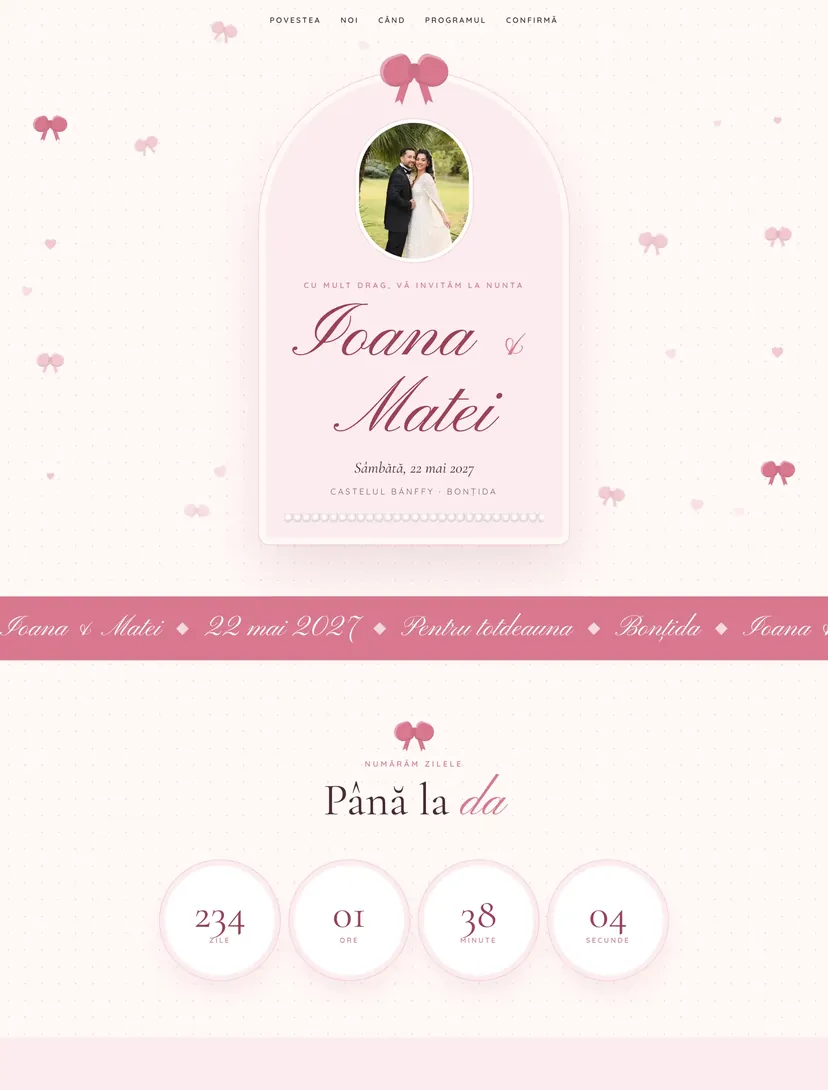
Why guests will pass the link on
Every Pinvite design has a surprise interaction built around its theme. In Coquette: a gift box with a bow that unties.
A gift box at the entrance
The first gesture is to untie the bow. The lid lifts and a shower of confetti reveals the invitation.
Interactive love letters
Three moments from your story, on cards that flip on touch, with a heart-shaped seal.
Sparkles at every move
On desktop the cursor leaves small pink sparkles behind. On phones, bows and hearts float discreetly.
The program on a ribbon
The moments of the day hang along a ribbon that unrolls as the guest scrolls down.
Colors and fonts of the Coquette design
A recommended starting point from our designers. Keep them or change them in the editor.
#FFF8F6#4A2A33#D9788F#F4C6CFThe Coquette invitation: for which celebration
Coquette is the aesthetic of bows, pearls and pale pink shades, a look that grew on TikTok and Pinterest and moved quickly into wedding dresses, cakes and decor. This design turns the style into small, sweet interactions that make guests smile and pass the link on.
It is the right choice for spring or summer weddings in gardens or castles, and for brides who want a feminine invitation without being kitsch. Colors and bows can be adjusted, and guests leave a message for the couple when they confirm.
What the invitation contains
The sections of this design, ready to use. Hide the ones you do not need.
From design to the link you send
Start from Coquette
Open the design in the editor, no card needed.
Make it yours
Change the names, date, venues, photos and texts. Preview on the phone in real time.
Send the link
On WhatsApp, by email or as a QR code on the printed invitation. Confirmations arrive live in your list.
About the Coquette design
Can I swap the pink for another color?
Do the animations work on older phones?
Can I change the colors, fonts and texts?
How do guests confirm?
How much does a Pinvite wedding website cost?
Does it work well on a phone?
Similar designs
Your wedding, in Coquettestyle.
Open the design in the editor, personalize it in minutes and send the link. Free for up to 15 confirmations.