
Sweet 16 invitation as a magazine cover
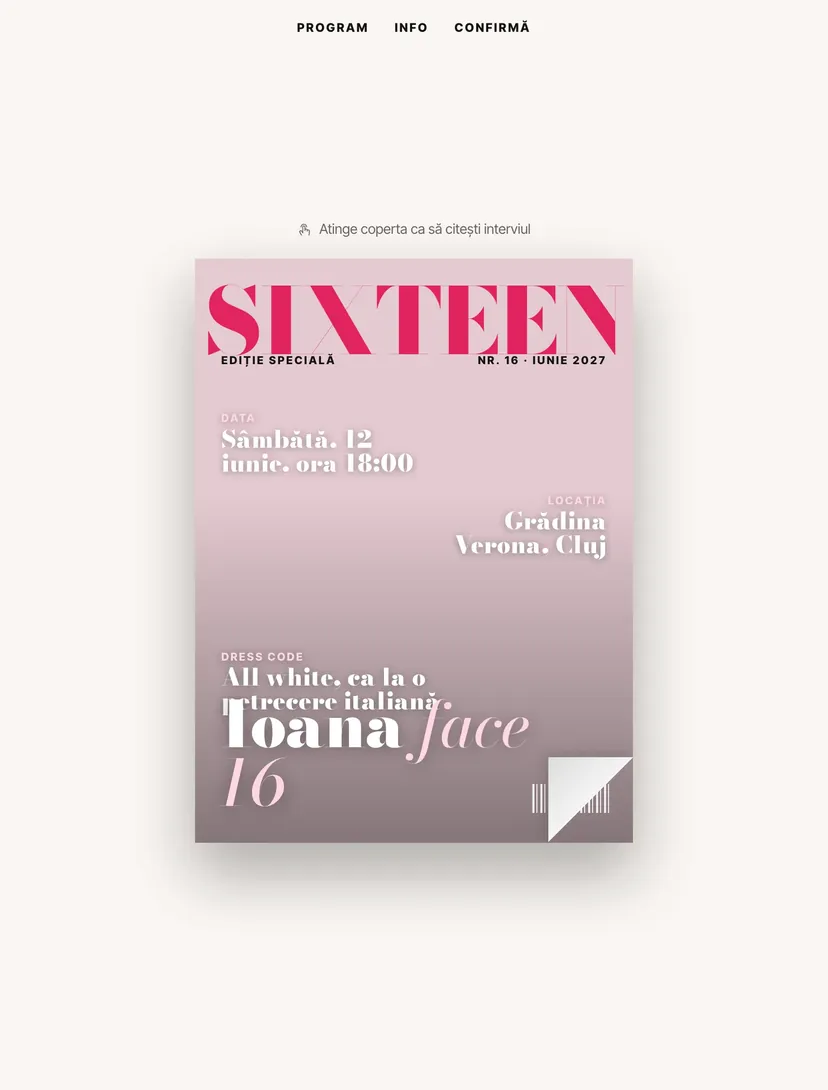
The guest of honor is on the cover of SIXTEEN magazine. The cover headlines are the party details themselves: the date, the venue and the dress code. Tap the cover and the magazine opens to a short interview where she says how she wants the evening to be.
Why guests will pass the link on
Every Pinvite design has a surprise interaction built around its theme. In Sweet 16 Cover: the cover that opens to the exclusive interview.
Details as headlines
The date, the place and the dress code are written like the headlines of a fashion magazine.
An exclusive interview
Six short questions and answers: how she wants the party to be, why the dress code, what gift she would like.
Her photo
The cover starts from the guest of honor's photo, so every invitation looks different.
A cover for every guest
At confirmation, the guest's name appears on a mini cover: “Special guest”.
Colors and fonts of the Sweet 16 Cover design
A recommended starting point from our designers. Keep them or change them in the editor.
#FAF6F2#141414#E0245E#FFD6E3The Sweet 16 Cover invitation: for which celebration
At sixteen, photos matter. The Sweet 16 Cover design puts the guest of honor on the cover of a fashion magazine, and the party information becomes its headlines. Guests have a reason to open the link: they want to see the cover.
It suits parties with a dress code (all white, pastel, glam), in gardens or on terraces. The interview inside is easy to edit and gives the invitation personality.
What the invitation contains
The sections of this design, ready to use. Hide the ones you do not need.
From design to the link you send
Start from the Pinvite editor
Open the editor, no card needed, and pick the Sweet 16 Cover design for your invitation.
Make it yours
The name, age, date, venue, photo and texts. See how it looks on the phone in real time.
Send the link
On WhatsApp, Instagram or by email. Confirmations appear in your list as they come.
About the Sweet 16 Cover design
Can I change the interview questions?
Which photo works best?
How do guests confirm?
How much does it cost?
Can I change the texts, colors and photo?
More birthday designs
The big day, in Sweet 16 Coverstyle.
Open the design in the editor, personalize it in minutes and send the link. Free for up to 15 confirmations.